Deploy backend
4.3.3 Deploy backend
The backend runtime on AWS is ECS Fargate; images are pulled from ECR.
After terraform apply — push image and roll ECS
After terraform apply, ECR, ECS, the ALB, and the task definition already exist; the task definition points at the image tag in ecs_backend_image_tag (terraform.tfvars). For each backend code change, run two steps:
- Docker push — Build the NestJS image from the Dockerfile in the repo, tag it to match ecs_backend_image_tag, log in to ECR, then docker push to ecr_repository_url (Terraform output).
- Roll ECS — aws ecs update-service … –force-new-deployment so new tasks pull the pushed image; wait until the service is stable and tasks are healthy behind the ALB.
Step 1 — ECR login, build, push (example: from the parent directory that contains SpendWiseApp; if you already cd into SpendWiseApp, adjust TF_DIR and docker build paths):
export TF_DIR=SpendWiseApp/infrastructure/environments/dev
export AWS_REGION="$(terraform -chdir=$TF_DIR output -raw aws_region)"
export ECR_REPO="$(terraform -chdir=$TF_DIR output -raw ecr_repository_url)"
export ECR_REGISTRY="${ECR_REPO%%/*}"
export IMAGE_TAG=latest   # must match ecs_backend_image_tag in Terraform

aws ecr get-login-password --region "$AWS_REGION" \
  | docker login --username AWS --password-stdin "$ECR_REGISTRY"

docker build -f SpendWiseApp/backend/Dockerfile -t spendwise-backend:"$IMAGE_TAG" SpendWiseApp/backend
docker tag spendwise-backend:"$IMAGE_TAG" "${ECR_REPO}:${IMAGE_TAG}"
docker push "${ECR_REPO}:${IMAGE_TAG}"
Step 2 — Redeploy ECS (run after docker push succeeds):
export ECS_CLUSTER="$(terraform -chdir=$TF_DIR output -raw ecs_cluster_name)"
export ECS_SERVICE="$(terraform -chdir=$TF_DIR output -raw ecs_service_name)"

aws ecs update-service \
  --region "$AWS_REGION" \
  --cluster "$ECS_CLUSTER" \
  --service "$ECS_SERVICE" \
  --force-new-deployment

aws ecs wait services-stable \
  --region "$AWS_REGION" \
  --cluster "$ECS_CLUSTER" \
  --services "$ECS_SERVICE"
Database migrations (Prisma)
After the backend ECS service is running stably, run the bash block below to apply migrations (Prisma). Use the SpendWiseApp repo root (with infrastructure/environments/dev); if your shell is in the parent directory, cd SpendWiseApp first.
export TF_DIR="infrastructure/environments/dev"
export TFVARS="$TF_DIR/terraform.tfvars"

REGION=$(
  grep -E '^[[:space:]]*aws_region[[:space:]]*=' "$TFVARS" \
    | head -1 \
    | sed -E 's/.*"([^"]+)".*/\1/'
)
ASSIGN_PUBLIC=DISABLED
grep -E \
  '^[[:space:]]*ecs_assign_public_ip[[:space:]]*=[[:space:]]*true' \
  "$TFVARS" >/dev/null 2>&1 \
  && ASSIGN_PUBLIC=ENABLED

export REGION ASSIGN_PUBLIC
export CLUSTER=$(
  terraform -chdir="$TF_DIR" output -raw ecs_cluster_name
)
export TASK_FAMILY=$(
  terraform -chdir="$TF_DIR" output -raw ecs_task_definition_family
)
export SUBNETS=$(
  terraform -chdir="$TF_DIR" output -raw ecs_private_app_subnet_ids_csv
)
export ECS_SG=$(
  terraform -chdir="$TF_DIR" output -raw ecs_tasks_security_group_id
)

NETCFG='awsvpcConfiguration={subnets=['
NETCFG+="${SUBNETS}"
NETCFG+=']'
NETCFG+=',securityGroups=['
NETCFG+="${ECS_SG}"
NETCFG+=']'
NETCFG+=',assignPublicIp='
NETCFG+="${ASSIGN_PUBLIC}"
NETCFG+='}'

OVERRIDES='{"containerOverrides":['
OVERRIDES+='{"name":"backend","command":["npx","prisma","migrate","deploy"]}'
OVERRIDES+=']}'

export TASK_ARN=$(
  aws ecs run-task \
    --region "$REGION" \
    --cluster "$CLUSTER" \
    --launch-type FARGATE \
    --task-definition "$TASK_FAMILY" \
    --network-configuration "$NETCFG" \
    --overrides "$OVERRIDES" \
    --query 'tasks[0].taskArn' \
    --output text
)

aws ecs wait tasks-stopped \
  --region "$REGION" \
  --cluster "$CLUSTER" \
  --tasks "$TASK_ARN"

aws ecs describe-tasks \
  --region "$REGION" \
  --cluster "$CLUSTER" \
  --tasks "$TASK_ARN" \
  --query 'tasks[0].containers[0].exitCode' \
  --output text
describe-tasks prints the container exitCode: 0 means the migration succeeded; any other value is an error — check CloudWatch logs (ecs_log_group in Terraform output). prisma migrate deploy applies only migration files already under prisma/migrations.
After that succeeds, smoke-test a few features to confirm the browser can call the API from the Amplify frontend to the ECS backend as expected.
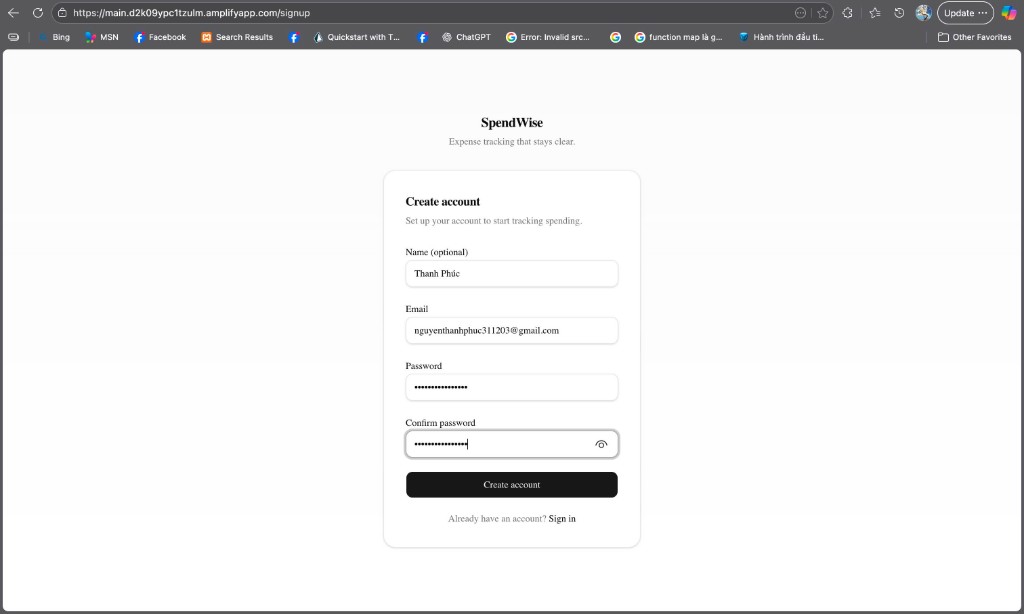
Sign-up check (Cognito): exercise sign-up — after a successful submit, the browser should go to the Confirm Signup page.
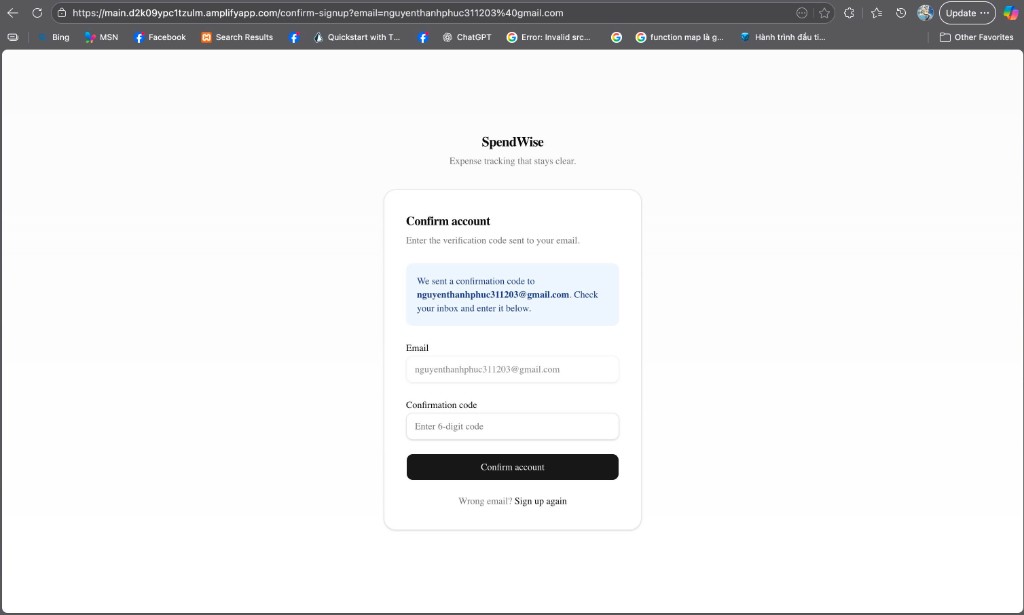
Next, the Confirm Signup page appears (the URL usually contains confirm-signup and an email parameter); the user enters the verification code Cognito sent by email. Amazon Cognito manages this flow.
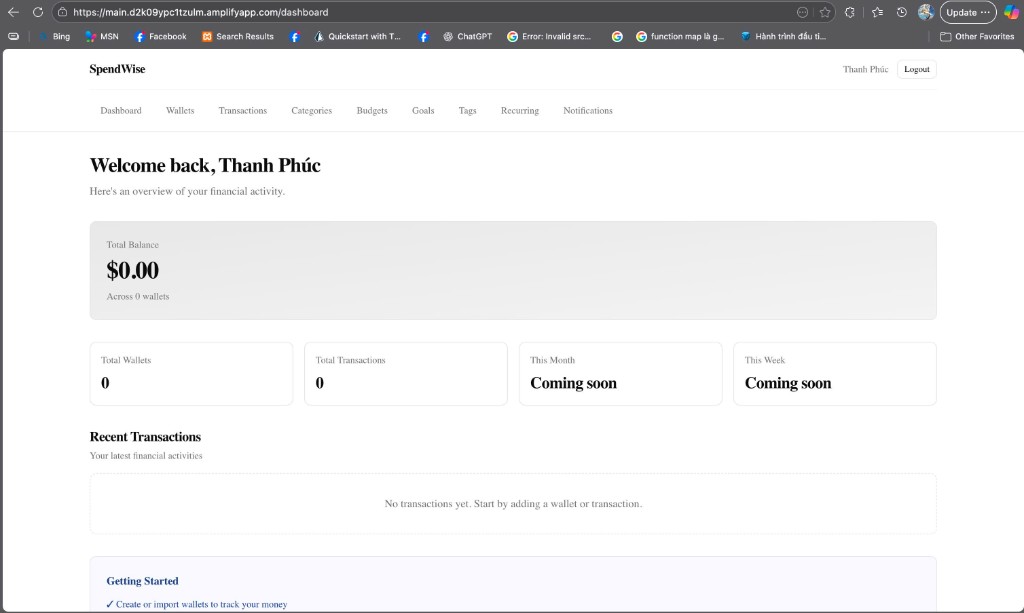
After sign-in: the dashboard UI (for example /dashboard on the Amplify domain) shows a Cognito session and that the protected Next.js route loaded; further UI actions call the ECS API when there is data.
Design reference: 4.2.3 Backend and runtime platform.