Terraform deployment (by layer)
4.3 Terraform deployment (by layer)
This chapter is a hands-on AWS workshop: you work from a Git clone of SpendWise on GitHub, edit configuration locally, and run Terraform under infrastructure/ in that repository. Design rationale is in 4.2 AWS infrastructure and security foundation. Here the focus is order of work and opening the right files in the repo — not dumping long Terraform into the browser to copy.
Workshop flow
- Clone the repository. Official URL: https://github.com/benguinsan/spendwise. The repo root contains frontend/, backend/, and infrastructure/.
git clone https://github.com/benguinsan/spendwise.git
cd spendwise
Install tooling on your laptop: Terraform, AWS CLI, and a current Git client. Configure AWS credentials for the lab account with aws configure or environment variables.
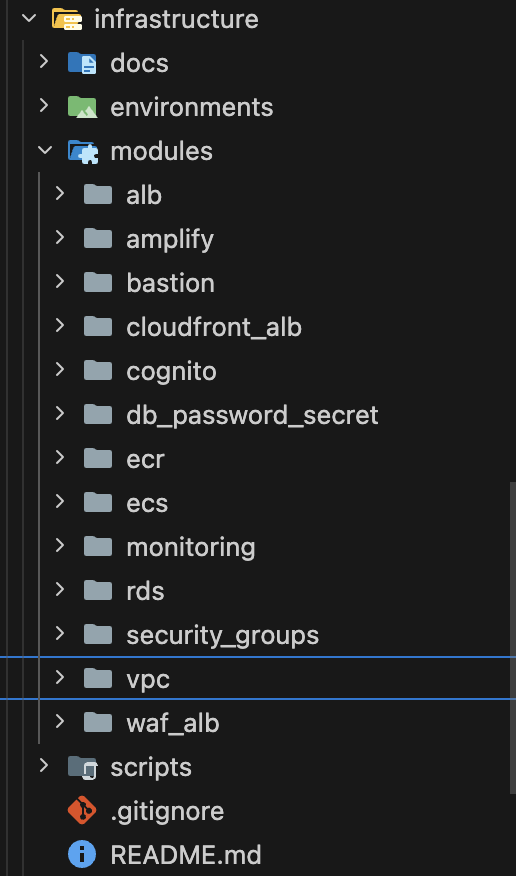
Open the stack in an editor. All Terraform for the sample environment lives under infrastructure/ from the repo root. The dev root module is environments/dev/main.tf; reusable pieces live under modules/.
Prepare variables. In infrastructure/environments/dev, copy terraform.tfvars.example to terraform.tfvars and fill in values. Do not commit tokens or secrets.
Deploy in layers using the sections below. Run terraform init, plan, and apply in environments/dev. In practice one apply often covers the whole stack; the numbered sections explain which module plays which role.
How to use these pages: Treat them as a checklist and roadmap. Open the matching paths in your clone — do not copy whole Terraform pages from the workshop site.
Why use Terraform
- Infrastructure as code: VPCs, security groups, RDS, ECS, and related resources live in versioned files.
- Modules: modules/vpc, modules/ecs, modules/rds, modules/amplify, modules/cognito, and others line up with the layers in section 4.2.
- Ordering: Terraform resolves dependencies so network → compute → data stay consistent.
Repository layout (infrastructure)